
How Pikka Speech Upgrades a Simultaneous Interpretation System
On this pageSection guide
Many venues already own the expensive distribution half of a simultaneous interpretation system: transmitters, infrared radiators or radio-frequency antennas, pocket receivers, charging cases, headphones, cabling, and staff routines. Their difficult question is not necessarily whether to discard that investment. It is whether AI language channels can enter the same trusted receiver path without recreating the full interpreter-booth workflow.
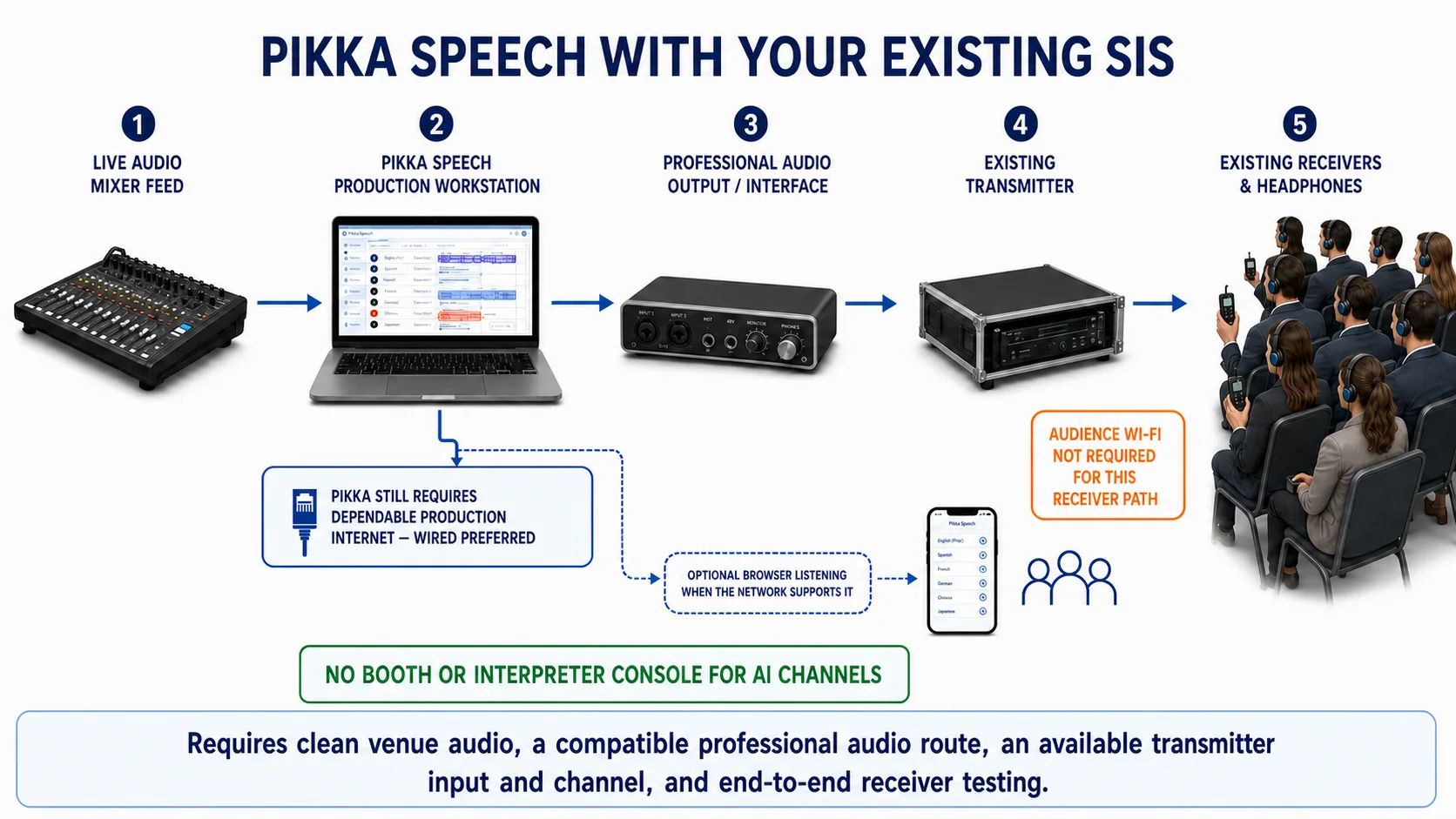
The practical answer is a hybrid architecture. Send a clean live feed from the venue mixer into Pikka Speech. Select an AI language channel on a production computer. Route that audio through a suitable professional audio output into an available input on the venue's existing transmitter. The transmitter then distributes the channel to the existing receivers. For the audience, the familiar last metre remains unchanged. For the AI language channel, the booth, interpreter console, and human interpreter audio chain are not part of that route.
If you are evaluating this as a purchase rather than designing the rack, start with the focused AI simultaneous interpretation system solution page . It summarizes the fit criteria, commercial model, equipment questions, and deployment decision; this guide provides the deeper engineering and operational detail behind it.
This is especially compelling where attendee Wi-Fi is crowded, inconsistent, or too weak to support hundreds of simultaneous browser audio streams. The receiver system carries the audience distribution load over its own installed infrared or radio path. Pikka's production computer still needs dependable connectivity, and a wired production connection is the preferred design when the venue can provide one. The architecture therefore reduces dependence on audience Wi-Fi without removing the production connection requirement.
That distinction is the heart of this guide. “The audience does not need Wi-Fi for the retained receiver path” is accurate. “The AI system works without internet” is not. “No booth or interpreter console is needed for an AI channel” is accurate. “No audio hardware or technical operator is needed” is not. A strong design preserves what the installed system does well and changes only the language-production stage.
What Pikka Speech changes—and what it deliberately keeps
A conventional simultaneous interpretation installation is a chain, not one box. It may include microphones, a mixing console, interpreter booths, interpreter consoles, audio distribution, transmitters, infrared radiators or RF antennas, receivers, headphones, charging equipment, and technicians. The exact topology varies by venue and manufacturer. The currentISO 20109:2025 equipment standard addresses requirements and recommendations for equipment used in simultaneous interpreting. TheBosch INTEGRUS operation manual is one concrete, current example of a system made from transmitters, radiators, pocket receivers, and interpreter equipment.
In the proposed hybrid, Pikka Speech takes responsibility for creating the AI interpretation output. It does not pretend that the venue's distribution estate has disappeared. The venue can continue using its transmitter, radiators or antennas, receivers, headphones, charging cases, channel labels, and distribution desk. That retained infrastructure is the very reason the design remains useful when the audience network is weak.
This component-by-component view prevents a common purchasing mistake. A venue may hear “AI interpretation” and assume the choice is either a fully traditional installation or a fully phone-based event. It is not. The middle path can be more valuable: retain the physical distribution system, replace the booth workflow only for the selected AI channels, and preserve human channels where professional judgment is required.
The exact five-stage signal path
- 1Live mixer feedA clean program, floor, or dedicated microphone mix leaves the venue console.
- 2Pikka SpeechThe production computer sends the source into the event room and receives the selected AI language channel.
- 3Professional audio outputA compatible output and audio interface convert the chosen channel into a signal suitable for the venue system.
- 4Existing transmitterThe venue's transmitter accepts that routed audio on an available language input or channel.
- 5Existing receiversAttendees select the assigned channel on the receivers they already know how to use.
Stage 1: take a clean feed from the live mixer
The first requirement is not AI; it is intelligible source audio. The mixer should provide the production computer with a feed appropriate for speech recognition and interpretation. Depending on the event, that may be the main program mix, a speech-only auxiliary mix, the floor language feed, or a dedicated microphone bus. A music-heavy program mix, audience-heavy room microphones, clipping output, or a feed containing translated return audio can all reduce clarity or create routing problems.
The venue audio lead should decide which console output carries the source, document whether it is mic level or line level, confirm whether it is balanced or unbalanced, and set gain conservatively. A professional USB audio interface is the normal bridge between a line-level console feed and the computer. A laptop's consumer headset socket should not be assumed to accept a console output safely or cleanly. The connector fitting physically does not prove electrical compatibility.
Stage 2: create and monitor the Pikka Speech language channel
The production computer joins the configured Pikka Speech event, receives the mixer source, and creates the selected AI language output. The operator should confirm the source language configuration, the target language, channel label, input device, input level, and live state before routing anything to attendees. A language name on screen is not sufficient proof: monitoring must confirm that the channel contains the intended source and output.
Pikka currently exposes a 15-minute test-session option and supports event configurations up to 14 hours. Those product limits are useful for planning, but neither substitutes for a venue rehearsal. A rehearsal checks the real microphones, console bus, computer, browser, account permissions, network, audio interface, transmitter input, distribution coverage, receiver channel, and headphone output as one chain.
Stage 3: select a professional audio output
The AI language channel must leave the computer through a known output. Where the browser and operating system expose per-output selection, the operator can select the assigned device. Where they do not, the operating system's audio routing becomes the control point. Either way, the production team must prove the mapping after every cable change, browser restart, operating-system update, interface reconnect, or sleep-and-wake cycle.
One stereo interface can sometimes carry two independent mono language feeds, but that is a venue-specific engineering choice rather than a universal rule. Additional languages may require more physical outputs, more routing computers, a multi-output interface, a digital audio network bridge, or a different channel plan. Pikka's software language capacity and the venue's number of transmitter inputs are separate constraints. The smaller capacity controls the deployed design.
Stage 4: feed an available transmitter channel
Connect the interface output to an available transmitter input using the cable, isolation, level, and connector standard required by that transmitter. The venue technician should assign a language channel, set input sensitivity, confirm the absence of clipping and hum, and label the source. If the transmitter accepts digital network audio rather than an analogue input, a suitable bridge or the venue's audio network may be needed. This guide does not assume that all systems accept the same signal.
Avoid plugging an unverified laptop output straight into a rack simply because an adapter exists. Ground loops, consumer-to-professional level mismatches, stereo-to-mono cancellation, phantom power, unbalanced cable runs, and incorrect input sensitivity can produce distorted or silent audio. The safe path is the venue's normal professional interface practice, measured and monitored by the audio team.
Stage 5: verify the receiver experience
The end-to-end test happens at the listener's ear, not at the laptop meter. Walk the venue with the same receiver and headphone model attendees will use. Check the assigned language number, listening level, coverage at seating edges, line-of-sight limitations for infrared systems, interference considerations for radio systems, receiver battery state, and intelligibility during a realistic speaker segment. Repeat the test for every configured language channel.
Keep a receiver at front of house for continuous confidence monitoring. A green meter at the mixer proves only that audio exists there. It does not prove that the correct AI language reaches the correct transmitter input, radiator or antenna path, receiver channel, and headphones. Monitoring the last point in the chain catches wrong-channel and silent-output failures that upstream meters miss.
Why this is a strong option when attendee Wi-Fi is weak
Phone-based listening is convenient when a venue has enough wireless capacity, a sound internet route, suitable attendee devices, and a support plan. But event Wi-Fi is a shared system. Every attendee may also be messaging, uploading media, refreshing agendas, scanning exhibitor content, and joining video calls. Signal strength shown by a phone is not the same thing as sustained capacity, low loss, or dependable access to an internet audio stream.
Reusing an installed transmitter and receivers changes the scaling problem. The production side consumes the Pikka connection. The audience side receives the translated channel over the venue's purpose-built distribution path. Adding more listeners does not add one Pikka browser stream per receiver. The receiver inventory and coverage become the audience constraints instead of Wi-Fi access points, captive portals, attendee data plans, phone batteries, and browser audio permissions.
That is why this hybrid can be the best option for a specific, important category of event: the venue already has a working transmitter/receiver system, the attendee Wi-Fi is weak or crowded, and the production team can provide a dependable connection to the Pikka workstation. It is a fit-based conclusion, not a universal ranking. A venue without working distribution hardware may be better served by browser access. An event without dependable production connectivity needs a different interpretation plan or a fully tested backup.
The retained receiver route also simplifies the audience instruction. Staff can hand out a numbered receiver and point to a language channel. There is no QR scan, captive-portal step, browser permission, volume-setting tutorial, or risk that a phone call interrupts listening. These are operational advantages, not guarantees: receivers still require charging, sanitation, distribution, collection, spares, and staff support. The hybrid exchanges one set of audience dependencies for another, more familiar set that many established venues have already learned to manage.
If the Wi-Fi becomes usable, Pikka's browser listener path can coexist as an optional alternative for people who prefer their device. Do not count that path as critical redundancy until it has been load-tested. Two outputs that share the same production computer, internet circuit, account, or source feed are not fully independent. Real redundancy requires identifying the shared failure points.
For an overview of Pikka's wider event workflow and current published options, see the Pikka Speech product page. For a general explanation of the category, readhow simultaneous interpretation works. This guide stays focused on the installed-system upgrade path.
Design the production connection separately from attendee Wi-Fi
Event teams often discuss “the Wi-Fi” as though the venue has one undivided network. In practice, production, exhibitors, staff, point-of-sale systems, presenters, and attendees may use different virtual networks, access points, internet circuits, firewall policies, and service levels. The hybrid design should put the Pikka workstation on a production route controlled with the AV team, not leave it competing anonymously on the public attendee network.
A wired Ethernet handoff is preferred because it removes the radio hop between the workstation and the venue network. Wired does not automatically mean dependable: the circuit can still be bandwidth-limited, filtered, congested, or misconfigured. It does, however, eliminate changes in local signal strength and contention at the workstation. Ask the network team which circuit serves the port, whether a captive portal or reauthentication can interrupt it, whether outbound media traffic is allowed, and who can troubleshoot it during show time.
If wired service is impossible, use a production Wi-Fi network whose coverage has been measured at the operating position. Secure the workstation from roaming between networks and disable automatic connection to untrusted alternatives. A cellular connection may be a backup where coverage and venue policy permit, but a speed test taken in an empty hall does not predict performance when the building is full. Test the backup under realistic conditions and document how the operator changes over without confusing the audio route.
What to measure before the event
A single download-speed number is not enough. Real-time audio depends on stable bidirectional transport. The production team should check upload and download behavior, packet loss, latency consistency, DNS resolution, firewall access, and whether the connection remains usable for the planned duration. The necessary threshold depends on the actual Pikka event and should be confirmed with a realistic rehearsal rather than invented from a generic bandwidth rule.
Record the result at the exact front-of-house or interpretation-control position. Repeat it after the exhibition floor, media room, or audience network becomes active if possible. Keep the test method and time with the show file. When production and public traffic share a circuit, ask whether the network team can reserve or prioritize the production path. The goal is not to produce an impressive screenshot; it is to expose failure before the first translated sentence matters.
Audio engineering: turn a browser channel into a transmitter-ready feed
The most important implementation work happens between the Pikka output and the transmitter input. This is ordinary audio engineering, but it deserves explicit ownership. A browser may play the correct language through the laptop speakers while the transmitter receives silence. The operating system may merge two channels. A USB device may reappear under a different name. A stereo adapter may send one side of the signal out of phase. None of these failures is solved by the AI configuration alone.
Choose the output architecture before ordering cables
Start with the number of AI language channels that must reach physical receivers at the same time. Then inventory available transmitter inputs and channel capacity. Finally, choose the computer and audio-interface design that provides the required number of independently controllable outputs. Do not start with an inexpensive two-channel interface and later discover that the show needs six independent mono languages.
A single multi-output interface can be efficient, but it creates a shared device and driver dependency. Separate routing computers and interfaces can make each language easier to understand operationally, but increase equipment and operator workload. A digital audio network may provide flexible routing in an equipped venue, but it requires correct clocking, subscriptions, permissions, and network management. There is no universally best layout; the best layout is the simplest one the venue team can operate, monitor, and recover.
Respect signal level and electrical boundaries
Mixer outputs and transmitter inputs are commonly professional line-level connections, while laptop headset ports and some compact interfaces are designed for different levels and impedances. Balanced connections help reject noise over longer cable runs, while unbalanced consumer connections are more vulnerable. Isolation transformers or DI-style devices may be appropriate when the venue encounters ground-loop hum, but they should be selected by the audio engineer, not added blindly to mask an unidentified fault.
Set gain stage by stage. Keep the digital output below clipping. Set the interface output to a known reference. Adjust the transmitter input sensitivity so normal speech is clear with headroom for louder voices. Compare the receiver level with the venue's existing language channels. Excessive level can distort; insufficient level can cause listeners to raise their headphone volume and hear more noise. Normalization is a listening and measurement task, not a visual guess from one meter.
Prevent feedback and translated-audio recirculation
The feed entering Pikka should contain the source speaker, not Pikka's own output. If the transmitter return, receiver monitor, or translated playback enters the source mix, the system can interpret its own translated speech. At best that creates confusing duplicate content; at worst it creates a loop. Use a dedicated mix-minus or clean auxiliary feed and verify it with solo monitoring. Label the console bus so another operator does not accidentally add the return during the show.
Similar care is required for online presenters and remote contributors. If the conferencing platform sends both remote program audio and the Pikka return into the same bus, echo cancellation and mix-minus routing can change what reaches the AI input. Trace the route from each microphone or remote source to Pikka and from Pikka back to the transmitter. Draw it. A one-page signal diagram is often more useful during a failure than a paragraph in the event proposal.
Use confidence monitoring at three points
Monitor the source feed before Pikka, the selected AI language at the computer output, and the final receiver. These three points separate source problems from interpretation problems and distribution problems. If the source monitor is poor, fix microphones or the console bus. If the source is clear but the Pikka output is wrong, check the event and language configuration. If both are correct but the receiver is silent, investigate the physical output, transmitter input, channel assignment, radiator or antenna path, and receiver.
The monitors should not create their own feedback path. Use isolated headphones or a controlled solo bus. Keep the front-of-house confidence receiver labelled and powered. For multiple languages, build a timed rotation into the operator checklist so a quiet failure on a less-used channel is not missed for an hour. Where bilingual staff are unavailable, monitoring can still confirm that speech exists, follows the source, and does not contain obvious routing errors, while a qualified reviewer checks linguistic quality during rehearsal.
Map software languages to physical channels without ambiguity
A Pikka target language, a computer output, a transmitter input, a transmitted channel number, a receiver display number, and an attendee-facing label are six different identifiers. If the team calls all of them “Channel 2,” a last-minute change can silently swap languages. The show file should contain one mapping row per output and treat every field as explicit.
Assign stable names to computers and interfaces, disable unnecessary system sounds, and keep notification audio away from the transmitter route. Confirm whether the operating system treats an interface as stereo pairs or independent channels. If software only selects a device rather than a numbered hardware output, use the approved routing method to isolate the language. Do not rely on undocumented behavior discovered five minutes before doors.
Pikka's current configuration lists 99 source-language codes and 142 listener language or dialect codes, combining into 13,635 directed language pairs after same-language and Chinese-dialect compatibility exclusions. Those counts describe configured options, not a promise that every source can translate to every target or that every language performs equally for every accent and domain. Check the actual source-target configuration required for the event, then test representative speakers, names, technical terms, acronyms, and numbers.
Run the event as a production system, not a browser demo
The hybrid is simpler than building a booth for each AI language, but it is still live production. Assign named roles. At minimum, someone owns source audio, someone owns Pikka configuration and output, and someone owns the transmitter/receiver system. One skilled person may cover multiple roles on a small event, but the responsibilities should remain distinct in the checklist.
Before equipment arrives
Collect the agenda, speaking languages, target languages, expected and maximum listener counts, room schedule, venue system model, transmitter input type, available channels, receiver inventory, network contact, and content-risk profile. Ask whether the installed system is fully operational or merely listed on an old venue specification. Confirm when it was last used, where batteries are stored, whether radiators or antennas cover the current room layout, and whether any channels are reserved for human interpreters.
Obtain representative audio or arrange a speaker test. Gather names, product terminology, abbreviations, geographic references, numbers, and specialist vocabulary. Decide which sessions may use AI, which require qualified human interpreters, and what the audience will be told. Define what happens if a language output is unavailable: silence, source audio, a human channel, a browser alternative, or a paused session. Ambiguity during failure is more damaging than a conservative policy agreed in advance.
During setup
Build from source to listener. Confirm microphone and console feed first. Then confirm Pikka input. Then monitor each AI output at the assigned interface. Then feed the transmitter and check its meters. Finally, listen through a receiver in the audience. This sequence keeps troubleshooting local: when a step fails, the last confirmed boundary identifies where to start.
Secure cables, label both ends, photograph the final patch, save the routing configuration, and prevent computers from sleeping. Connect power supplies and use an appropriate uninterruptible power source where the production design calls for it. Disable nonessential notifications and automatic update restarts. Keep the browser session, audio controls, network state, and monitoring tools visible without covering one another.
During rehearsal
Rehearse a complete representative segment, not only “one, two, three.” Include different speakers, a handover, a video playback, a question from the room, key terminology, numbers, and deliberate silence. Check how the system behaves when the speaker changes language unexpectedly. Validate that no video or walk-in music reaches the speech-only feed unless intended. Walk to difficult receiver positions while the actual language output plays.
Trigger the agreed backup drills in a controlled rehearsal: disconnect the primary network, reconnect the audio interface, restart the browser, change an output mapping, replace a receiver battery, and confirm the escalation contact. The objective is not to make failures invisible. It is to make the operator's response predictable and to learn which states recover automatically and which require deliberate re-selection or reauthentication.
During show time
Start continuous monitoring before doors. Keep a log with session start, source change, language-channel state, warnings, network events, routing changes, and audience reports. Use one communication channel for technical escalation so information does not fragment. Any operator changing the console bus, interface, transmitter input, or Pikka configuration should announce and record the change.
Treat audience feedback as evidence to triage, not a vague complaint. Record the receiver number, channel, seat location, language, time, and symptom. One silent receiver may be a battery or headphone fault; a whole seating section may be a coverage issue; every receiver on one language may indicate routing; all languages stopping together may point to a shared source, power, distribution, or production connection. Structured reports shorten the path to the responsible layer.
After the event
Close the Pikka event according to the event plan, secure any retained records, collect and count receivers, separate faulty units, recharge batteries, remove temporary patches, and restore the venue rack to its documented state. Review the incident log with network, audio, language, and event leads. Capture the source of each issue rather than merely writing “translation problem.”
Compare expected and actual listener counts, language usage, receiver demand, support contacts, and failure points. That evidence improves the next channel plan. It may show that one language belongs on the browser path, another should remain human, and high-demand languages deserve dedicated receiver channels. A hybrid architecture is valuable partly because it allows these choices per channel rather than forcing one delivery method on the whole event.
Where the Pikka hybrid has a real advantage
The strongest advantage is not that AI makes every component disappear. It is that Pikka can change the most resource-intensive language-production stage while preserving a distribution system that already works. For an AI channel, the venue does not have to dedicate a booth, interpreter console, or human interpreter audio position. The venue can still use its receivers, established channel signs, distribution desk, and coverage design.
The second advantage is network concentration. A browser-only plan makes every attendee device part of the network design. The retained receiver plan moves the critical internet dependency to the production workstation and keeps the audience on the installed RF or infrared route. This is especially useful in hotels, convention halls, temporary marquees, older venues, and crowded event floors where public wireless quality is uncertain but the interpretation system is known and maintained.
The third advantage is channel-level choice. An event can use Pikka for suitable AI language channels, keep professional interpreters for sensitive or complex sessions, provide browser captions to selected attendees, and show translated text on displays. The production design does not have to declare all-AI or all-human. It can match method and delivery to risk, audience, equipment, and budget.
The fourth advantage is commercial visibility. Pikka publishes per-event component prices: $499 for AI interpretation plus a $49 target-language base, which is $548 for one AI audio language before listener additions or other selected services. The current configuration includes 25 listeners and lists additional audio listeners at $2 each. Text translation, live caption displays, and video have their own published units. Always confirm the live event configuration and written quote before purchase because requirements and prices can change after this article's August 2, 2026 review date.
Calculate the whole event, not one software line item
A fair cost comparison puts the same scope on both sides. For the Pikka hybrid, include Pikka event services, routing computers, professional audio interfaces, cables or digital bridges, network service, receiver-system labour, receiver preparation, rehearsal, monitoring, backup equipment, and any human channels. If the venue already owns the hardware, distinguish sunk investment from the actual event rental or operating charge. “Already installed” does not mean “free”; technicians, maintenance, batteries, cleaning, and loss exposure remain.
For a traditional proposal, include interpreters, travel where applicable, scheduling, booths, consoles, interpretation-system equipment, technicians, receiver distribution, and overtime. Some of those elements may also be retained in the hybrid. Do not attribute their removal to Pikka if the event still needs them for a human language channel. Compare final written proposals with identical language count, listener count, duration, rehearsal, support window, equipment, and tax assumptions.
Avoid invented savings percentages. The difference depends on what the venue owns, what it normally rents, how many languages need human professionals, how many independent outputs the rack accepts, and how much production engineering the hybrid needs. The defensible advantage is structural: an AI channel removes the booth-console-interpreter production path for that channel while reusing the distribution estate. The financial result must come from the actual bills of materials.
A procurement worksheet that exposes hidden assumptions
- List each session, source language, and target language separately.
- Mark each target as AI, professional human, undecided, or unavailable.
- Record expected and maximum concurrent listeners per language.
- Separate receiver listeners from browser-audio and text-only listeners.
- Count available transmitter inputs and usable audience channels.
- Count independent computer audio outputs and spare outputs.
- Price production internet and a materially independent backup route.
- Include rehearsal, show-call, overtime, receiver handling, and post-event labour.
- State taxes, currencies, validity dates, cancellation terms, and support scope.
- Document what happens if an AI language or production connection is unavailable.
This worksheet also supports an honest Pikka-versus-competitor review. A browser-first event translation service, a broadcast caption insertion system, and an installed receiver retrofit solve different problems. Ourcomparison hub separates those workflows and links competitor claims to primary sources. This article's “best option” conclusion applies only to the installed-receiver, weak-audience-Wi-Fi case described here.
Choose AI and human channels by consequence, not enthusiasm
AI interpretation is useful, but it is not identical to professional human interpreting. Automated output can mistranslate names, numbers, negation, specialist terminology, idioms, accented speech, overlapping voices, jokes, and culturally dependent meaning. Poor source audio increases the risk. A receiver system can distribute a channel flawlessly while the language content itself is wrong. Distribution quality and interpreting quality are separate dimensions.
Use a consequence-based assessment. General informational sessions with clear speech and prepared terminology may be candidates for a tested AI channel. Medical, legal, safety-critical, crisis, disciplinary, negotiation, diplomatic, or rights-affecting content may require qualified human interpreters and the safeguards appropriate to that domain. Sign-language access is a different service and should not be represented as covered by an audio AI channel.
TheNational Council on Interpreting in Health Care guidance on AI-generated interpreting is healthcare-specific, not a universal event standard. It is nevertheless a useful example of the questions high-consequence buyers should ask about performance, disclosure, privacy, limitations, monitoring, and escalation. Apply the standards and professional requirements relevant to the event's jurisdiction and subject matter.
Hybrid can also mean keeping a human interpreter on the highest-consequence language while Pikka supplies additional informational languages that would otherwise be unavailable. The transmitter can carry both types if channel capacity and routing permit. Audience signs should describe language channels, not make listeners guess which technology is behind them. Where disclosure of automated interpreting is appropriate or required, provide it clearly before participants rely on the output.
A phased migration plan for an installed SIS
“Migration” should not mean disconnecting the old workflow on show morning. The safest route is a reversible pilot that leaves the venue's known configuration intact. Pikka enters through a spare transmitter input and channel. If the pilot does not pass the test criteria, remove the temporary patch and continue with the approved interpretation plan. Nothing in the installed distribution chain needs to be permanently replaced for the pilot.
Phase 1: document the existing system
Identify manufacturer and model, transmission technology, channel capacity, licensed frequencies where relevant, input connector and level, current rack patch, radiator or antenna coverage, receiver model and quantity, battery type, charging capacity, headphone inventory, technical owner, and recent service history. Photograph labels and drawings. Confirm whether the venue or a supplier controls configuration passwords and spare parts.
TheISO 24019:2022 standard for simultaneous interpreting delivery platforms covers requirements and recommendations for platforms used to deliver simultaneous interpreting. It is one relevant standards reference, while the installed manufacturer's current manual remains essential for the specific hardware. Do not infer electrical or channel compatibility from a generic SIS diagram.
Phase 2: build a bench test
Before occupying the ballroom, test a representative mixer output, computer, Pikka event, audio interface, transmitter input, and receiver. Use the same cable standards and software versions planned for the show. Confirm level, noise, stereo or mono behavior, output persistence after restart, receiver channel assignment, and a representative language sample. Record the approved settings and label the patch.
A bench pass proves basic compatibility, not venue coverage or network quality. It is still valuable because it separates electrical and routing questions from the pressure of the room setup. If the transmitter has no suitable spare input, the output count is insufficient, or the receiver channel plan cannot accommodate Pikka, discover that here and redesign rather than improvising onsite.
Phase 3: pilot one low-risk language channel
Select a session whose content, speaker style, audience expectation, and language pair are appropriate for the pilot. Keep listener numbers manageable. Provide a staffed support point and a documented fallback. Monitor source, Pikka output, and receivers throughout. Collect structured feedback about intelligibility, terminology, delay perception, receiver usability, and coverage rather than a single satisfaction score.
Phase 4: add channels only after capacity review
Each added language consumes configuration attention, an independently controlled output, a transmitter input and channel, monitoring time, signage, and receiver inventory. Recalculate all of those resources. A successful one-channel pilot does not prove that the same workstation and interface design can deliver eight physical channels. Scale the audio architecture deliberately and reserve a spare path where the event risk justifies it.
Phase 5: standardise the proven show file
After successful events, create a venue template containing diagrams, hardware models, tested software versions, output mappings, gain references, network contacts, receiver labels, rehearsal scripts, monitoring rotation, backup steps, and post-event procedure. Review the template whenever the browser, operating system, interface driver, transmitter configuration, Pikka product, or venue network changes. “It worked last year” is evidence for the concept, not proof of the current chain.
Troubleshooting the chain by boundary
Troubleshooting is fastest when operators resist changing several layers at once. Begin at the last known-good point and move downstream. Announce every change, note the time, and restore the previous state if it does not improve the symptom. The table below is a starting framework; follow the manufacturer's instructions and venue safety procedures for the actual equipment.
Never fix a routing symptom by randomly reconnecting outputs during live speech. That can move the wrong language onto another audience channel. If the plan permits, mute or clearly announce an affected channel, trace it with headphones and meters, restore it, and verify at the receiver before telling attendees it is back. Keep the unaffected channels stable.
When this hybrid is—and is not—the best option
The Pikka-to-transmitter architecture is the strongest choice when five conditions align: the venue already has a maintained receiver system; audience Wi-Fi is weak, crowded, or operationally undesirable; the Pikka production position can obtain dependable internet; suitable professional audio inputs and outputs are available; and the selected content and languages pass the AI-risk assessment. Under those conditions, the system uses each layer for what it does best.
It is not automatically best when the installed hardware is obsolete or untested, receivers are insufficient, no transmitter channels are available, the production circuit is unreliable, the event needs verified native broadcast or SDI integration, or the content requires qualified humans. A browser listener workflow may be simpler for a small event with excellent network capacity. A traditional professional-interpreter workflow may be necessary for high-stakes sessions. A broadcast caption appliance serves a different output path.
Four deployment patterns to adapt—not copy blindly
The same five-stage signal path can support very different events. The examples below show how requirements change with the room, audience, and consequence of error. They are planning patterns rather than equipment prescriptions. Every venue must confirm its own transmitter inputs, legal or licensing obligations, receiver coverage, network route, and language configuration.
Pattern 1: hotel ballroom with crowded guest Wi-Fi
A hotel ballroom already has an infrared interpretation system and enough pocket receivers for the expected international delegates. Guest Wi-Fi is available, but the event organiser cannot obtain a load guarantee and past conferences have experienced captive-portal and congestion problems. The venue can provide a wired production VLAN at front of house.
The useful design is to take a speech-only auxiliary mix from the ballroom console into the Pikka workstation, route each approved AI language through an independently controlled interface output, and patch those outputs into spare infrared transmitter channels. Receiver signs list each language and number. The audience does not join guest Wi-Fi to listen. A browser link can remain available for a limited number of people, but it is not the primary channel.
The team must still inspect radiator sight lines after staging and scenic walls are installed. It must count charged receivers, confirm headphone hygiene, and test the wired VLAN for the complete rehearsal. The hybrid removes booths and consoles only for the AI languages. If one executive session requires a professional interpreter, that human channel keeps its appropriate workflow and uses another transmitter channel.
Pattern 2: convention centre with an RF receiver fleet
A convention centre operates a radio-frequency receiver system across a large hall. Public Wi-Fi coverage looks strong, but thousands of visitors will use it during the exhibition. The system integrator has documented transmitter inputs, permitted channel assignments, receiver tuning, and antenna coverage. Production networking is delivered on a separate supported circuit.
Here, the event may route several Pikka AI outputs into assigned transmitter channels, but radio planning remains the venue's responsibility. Pikka does not change frequency coordination, local spectrum rules, antenna placement, or interference management. The AV team performs a receiver walk before and during doors. If the show crosses multiple rooms, it checks whether the selected channel plan and coverage follow attendees or whether each room needs a separate route.
The advantage is again separation of concerns: Pikka creates language audio; the existing RF system distributes it. The production connection can be monitored by a small technical team while the audience listens without adding thousands of wireless browser sessions. The limitation is physical capacity. Six requested languages do not fit a rack with only three spare channels, no matter how many target options are visible in software.
Pattern 3: corporate campus with mixed receiver and browser audiences
A corporate auditorium has a maintained receiver system for in-room attendees and a strong managed network for overflow rooms and remote participants. The event needs two primary languages in the auditorium, translated text for a lobby display, and optional browser listening for staff elsewhere on campus.
The two physical Pikka language outputs enter the auditorium transmitter. The browser route serves only the approved remote and overflow audience, and captions use the configured display workflow. The team tests each delivery path independently because receiver audio, browser audio, and displayed text have different dependencies. It also checks access control, audience instructions, and the handling of event records under the organisation's policies.
This pattern demonstrates that retaining receivers does not prohibit browser access. It makes browser access a deliberate second route. Capacity planning can reflect the real audience instead of assuming that every person in the main room will stream audio. If the campus internet circuit fails, the receiver transmitters can still distribute an available local backup source, but they cannot generate new Pikka AI output without the production connection.
Pattern 4: high-consequence plenary with additional information channels
A conference includes a plenary where decisions have legal or safety implications, followed by general educational sessions. Qualified human interpreters cover the required plenary languages. The organiser also wants to offer additional languages for informational access during lower-risk sessions.
The channel plan marks human and AI production methods explicitly. Human interpreter audio retains its booths, consoles, or approved remote workflow. Selected Pikka outputs use separate professional audio paths into available transmitter inputs. The audience receives clear instructions, and the event policy states which channels are automated. During the plenary, only the professionally approved channels are offered where the consequence assessment requires them.
This is not a compromise that treats all channels as equivalent. It is a control strategy. The event expands language access where testing supports it without removing professional safeguards from sessions where meaning, interaction, and accountability demand human expertise. The same receivers can carry both types of channel, so the distribution workflow remains consistent even though language production differs.
Questions to put in the venue and supplier brief
A clear request for proposal makes uncertainty visible before price comparison. Ask for written answers and attach the signal-path drawing. If the venue cannot answer a transmitter or network question, assign an owner and a test date rather than filling the gap with an assumption.
- What are the manufacturer, model, firmware, input type, and current channel capacity of the transmitter?
- How many transmitter inputs and audience channels are genuinely spare during every requested session?
- Does the system use infrared, RF, or another distribution method, and what current coverage evidence exists?
- Which professional audio interfaces and cable standards are approved for external language feeds?
- Who is authorised to change transmitter sensitivity, channel assignment, or rack patching?
- How many working receivers, headphones, chargers, batteries, and spares will be available after testing?
- Who distributes, sanitises, collects, counts, and replaces receiver units during the event?
- Can the production position receive a dedicated wired network port, and which team supports it live?
- Is the production internet route separate from public Wi-Fi, and what shared upstream dependencies remain?
- Which outbound traffic policies, captive portals, session timeouts, or reauthentication rules could interrupt Pikka?
- What secondary production route is available, and has failover been rehearsed with the real workstation?
- Which mixer bus will feed Pikka, and is it isolated from translated returns, music, and unwanted room microphones?
- How will each Pikka target map to a computer output, transmitter input, receiver channel, and attendee label?
- Who continuously monitors source audio, Pikka output, and a real receiver during each session?
- Which sessions require qualified human interpreters, and who approved the consequence assessment?
- What disclosure, privacy, accessibility, record-retention, and participant-consent requirements apply?
- What is the exact fallback for each language if source audio, internet, Pikka output, or distribution fails?
- When will the full rehearsal occur after staging, network, transmitter, receivers, and final content are ready?
The supplier brief should also distinguish proof from intention. “Interface will be supplied” is not proof of independent output count. “Venue has Wi-Fi” is not proof of a supported production route. “Receivers available” is not proof that batteries hold charge or that the final seating layout has coverage. Ask for the artefact that closes each question: model sheet, patch drawing, inventory report, network test, rehearsal log, receiver walk, or named technical sign-off.
Final recommendation
If your venue already owns a working SIS transmitter and receiver fleet, do not begin by replacing it. Begin by identifying one spare channel and proving this route end to end: mixer feed, Pikka Speech, controlled professional output, compatible transmitter input, and attendee receiver. This preserves the part of the system that solves the weak-Wi-Fi audience problem and removes the booth and interpreter-console requirement for the selected AI channel.
Keep the qualification with the recommendation. Pikka is the language-production layer, not a substitute for clean venue audio, professional routing, a dependable production connection, tested distribution coverage, or human judgment where consequences demand it. The best deployment is not the one with the fewest boxes in a sales diagram. It is the one whose dependencies are known, monitored, and recoverable by the event team.
Sources and review method
This guide was reviewed on August 2, 2026. Pikka product counts, configuration limits, and published amounts were checked against the current Pikka Speech event configuration and Pikka Speech product page. The installed-system description was checked against current ISO catalogue records and a current Bosch INTEGRUS manufacturer manual. The AI risk discussion uses healthcare guidance only as an explicitly labelled, domain-specific example.
- ISO 20109:2025 — Simultaneous interpreting — Equipment — Requirements
- ISO 24019:2022 — Simultaneous interpreting delivery platforms — Requirements and recommendations
- Bosch INTEGRUS operation manual
- NCIHC Guidance for Contracting AI-Generated Interpreting Services
Product behavior, pricing, standards, venue equipment, and browser capabilities can change. Recheck live sources and the actual venue system before contracting or show day. If a statement cannot be demonstrated with the current event configuration, manufacturer documentation, or a complete rehearsal, treat it as an open question rather than an operational promise.